


Latest Version
Version
15.65.1
15.65.1
Update
July 20, 2025
July 20, 2025
Developer
TeamViewer Germany GmbH
TeamViewer Germany GmbH
Categories
Finance
Finance
Platforms
iOS
iOS
File Size
103.1 MB
103.1 MB
Downloads
0
0
License
Free
Free
Report
Report a Problem
Report a Problem
More About TeamViewer Remote Control
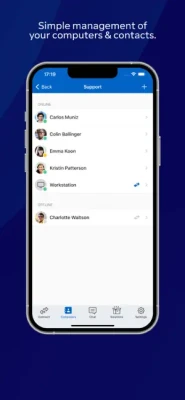
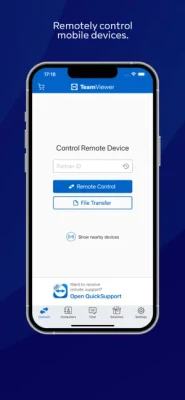
TeamViewer provides easy, fast and secure remote access to Windows, Mac and Linux systems. TeamViewer is already used on more than 200,000,000 computers worldwide. You can use this app to:
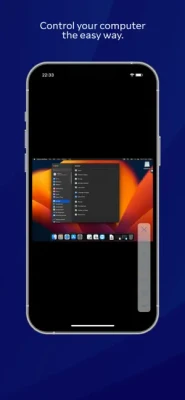
- Control computers remotely as if you were sitting right in front of them.
- On the go support your clients, colleagues, and friends
- Gain access to your office desktop with all of the documents and installed applications
- Remotely administrate unattended computers (e.g. servers)
Features:
- Effortlessly access computers behind firewalls and proxy servers
- Intuitive touch and control gestures
- Full keyboard functionality (including special keys)
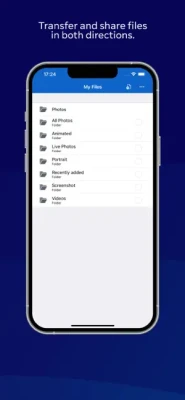
- Transfer files in both directions
- Multi monitor support
- Sound and video transmission in real-time
- Wake-On-LAN: switch on your computer remotely
- Highest security standards: 256 Bit AES Session Encoding, 2048 Bit RSA Key Exchange
- Plus so much more …
Quick guide:
1. Install this app
2. Install or start TeamViewer on your computer from our website
3. Enter your computer’s TeamViewer ID and password
TeamViewer subscriptions purchased from the app will be charged to your iTunes account and will automatically renew within 24 hours prior to the end of the current subscription period, unless auto-renewal is turned off, after purchase, go to your iTunes account settings. A subscription cannot be cancelled during the active subscription period.
Privacy Policy: https://www.teamviewer.com/apps-privacy-policy
Terms of Use: https://www.teamviewer.com/eula/
"Information on Optional Access*
● Camera: Necessary to generate video feed on the app
● Microphone: Fill the video feed with audio, or used to record message or session
*You can use the app even if you do not allow the optional permissions. Please use in-app settings to disable the access."
- On the go support your clients, colleagues, and friends
- Gain access to your office desktop with all of the documents and installed applications
- Remotely administrate unattended computers (e.g. servers)
Features:
- Effortlessly access computers behind firewalls and proxy servers
- Intuitive touch and control gestures
- Full keyboard functionality (including special keys)
- Transfer files in both directions
- Multi monitor support
- Sound and video transmission in real-time
- Wake-On-LAN: switch on your computer remotely
- Highest security standards: 256 Bit AES Session Encoding, 2048 Bit RSA Key Exchange
- Plus so much more …
Quick guide:
1. Install this app
2. Install or start TeamViewer on your computer from our website
3. Enter your computer’s TeamViewer ID and password
TeamViewer subscriptions purchased from the app will be charged to your iTunes account and will automatically renew within 24 hours prior to the end of the current subscription period, unless auto-renewal is turned off, after purchase, go to your iTunes account settings. A subscription cannot be cancelled during the active subscription period.
Privacy Policy: https://www.teamviewer.com/apps-privacy-policy
Terms of Use: https://www.teamviewer.com/eula/
"Information on Optional Access*
● Camera: Necessary to generate video feed on the app
● Microphone: Fill the video feed with audio, or used to record message or session
*You can use the app even if you do not allow the optional permissions. Please use in-app settings to disable the access."
Rate the App
Add Comment & Review
User Reviews
Based on 0 reviews
No reviews added yet.
Comments will not be approved to be posted if they are SPAM, abusive, off-topic, use profanity, contain a personal attack, or promote hate of any kind.















More »

Popular Apps

Love Keyboard - Neon ThemesMetamorph AI Labs

LINE: Calls & MessagesLINE (LY Corporation)

Rakuten Viber MessengerViber Media

YouTubeGoogle LLC

InstagramInstagram

Gmail 5Google LLC

Hotspot Shield: Fast VPN ProxyAnchorfree LLC

FacebookMeta Platforms, Inc.

Google MeetGoogle LLC

Get aCC_e55Isometric cyberpunk adventure
More »
Editor's Choice
YouTubeGoogle LLC

ThreadsInstagram
Hotspot Shield: Fast VPN ProxyAnchorfree LLC
FacebookMeta Platforms, Inc.
Gmail 5Google LLC
LINE: Calls & MessagesLINE (LY Corporation)
InstagramInstagram
Rakuten Viber MessengerViber Media
Google MeetGoogle LLC

Norton360 Antivirus & SecurityNortonMobile