
Latest Version
Version
4.0
4.0
Update
June 12, 2025
June 12, 2025
Developer
WhatsApp Chat Message Recover
WhatsApp Chat Message Recover
Categories
Communication
Communication
Platforms
iOS
iOS
File Size
49.2 MB
49.2 MB
Downloads
0
0
License
Free
Free
Report
Report a Problem
Report a Problem
More About Recover Deleted Messages App
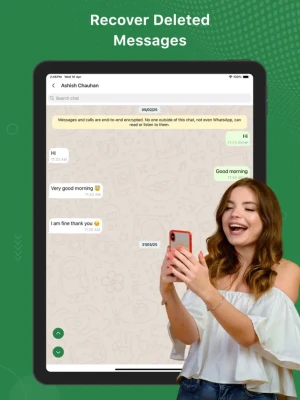
Recover Deleted Messages App: Fast, private messaging with dual chat, secure backups & clutter-free design. Stay connected with ease and peace of mind.
Stay connected like never before with Recover Deleted Messages App, the modern messaging app built for efficiency, privacy, and peace of mind. Whether you're chatting one-on-one or managing dual conversations, Recover Deleted Messages App helps you do it all—fast and stress-free.
Key Features:
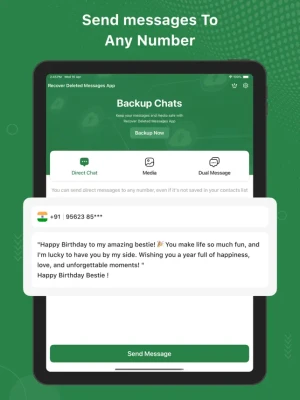
* Direct Message: Instantly connect with friends, family, or colleagues in a clean and clutter-free chat environment. Fast, reliable, and private just the way messaging should be.
* Dual Chat: Keep personal and professional conversations separate within a single app. Switch between two chat spaces with a tap—no confusion, no overlap.
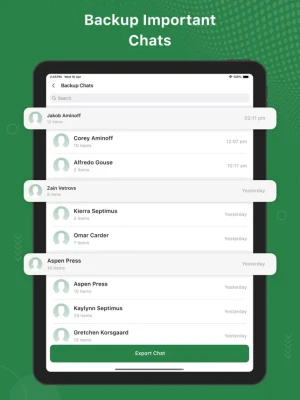
* Backup Important Chats: Never lose a memory or vital info again. With secure chat backup, your important conversations are always safe and easily restorable.
Recover Deleted Messages App is designed for people who want more control over their messages. Lightweight, intuitive, and secure—your conversations are always in your hands.
Download Recover Deleted Messages App now and upgrade your chat game today!
SUBSCRIPTION AND TERMS:
You may purchase an auto-renewing subscription through an In-App Purchase to enjoy all App Features without Ads:
• Auto-renewable subscription
• Weekly, 1 month and 1-year durations
• Your subscription will be charged to your iTunes account at confirmation of purchase and will automatically renew (at the duration selected) unless auto-renew is turned off at least 24 hours before the end of the current period.
• Current subscription may not be canceled during the active subscription period; however, you can manage your subscription and/or turn off auto-renewal by visiting your iTunes Account Settings after purchase.
* Link to Privacy Policy: https://recovermessagesapp.blogspot.com/2025/04/privacy-policy.html
* Link to Terms of use: https://recovermessagesapp.blogspot.com/2025/04/terms-conditions.html
* Link to EULA: https://recovermessagesapp.blogspot.com/2025/04/end-user-license-agreement.html
Key Features:
* Direct Message: Instantly connect with friends, family, or colleagues in a clean and clutter-free chat environment. Fast, reliable, and private just the way messaging should be.
* Dual Chat: Keep personal and professional conversations separate within a single app. Switch between two chat spaces with a tap—no confusion, no overlap.
* Backup Important Chats: Never lose a memory or vital info again. With secure chat backup, your important conversations are always safe and easily restorable.
Recover Deleted Messages App is designed for people who want more control over their messages. Lightweight, intuitive, and secure—your conversations are always in your hands.
Download Recover Deleted Messages App now and upgrade your chat game today!
SUBSCRIPTION AND TERMS:
You may purchase an auto-renewing subscription through an In-App Purchase to enjoy all App Features without Ads:
• Auto-renewable subscription
• Weekly, 1 month and 1-year durations
• Your subscription will be charged to your iTunes account at confirmation of purchase and will automatically renew (at the duration selected) unless auto-renew is turned off at least 24 hours before the end of the current period.
• Current subscription may not be canceled during the active subscription period; however, you can manage your subscription and/or turn off auto-renewal by visiting your iTunes Account Settings after purchase.
* Link to Privacy Policy: https://recovermessagesapp.blogspot.com/2025/04/privacy-policy.html
* Link to Terms of use: https://recovermessagesapp.blogspot.com/2025/04/terms-conditions.html
* Link to EULA: https://recovermessagesapp.blogspot.com/2025/04/end-user-license-agreement.html
Rate the App
Add Comment & Review
User Reviews
Based on 0 reviews
No reviews added yet.
Comments will not be approved to be posted if they are SPAM, abusive, off-topic, use profanity, contain a personal attack, or promote hate of any kind.













More »

Popular Apps
Love Keyboard - Neon ThemesMetamorph AI Labs
LINE: Calls & MessagesLINE (LY Corporation)

Rakuten Viber MessengerViber Media

InstagramInstagram

YouTubeGoogle LLC

Hotspot Shield: Fast VPN ProxyAnchorfree LLC
Gmail 5Google LLC

FacebookMeta Platforms, Inc.
Google MeetGoogle LLC

Get aCC_e55Isometric cyberpunk adventure
More »
Editor's Choice
YouTubeGoogle LLC

ThreadsInstagram
Hotspot Shield: Fast VPN ProxyAnchorfree LLC
FacebookMeta Platforms, Inc.
Gmail 5Google LLC
LINE: Calls & MessagesLINE (LY Corporation)
InstagramInstagram
Rakuten Viber MessengerViber Media
Google MeetGoogle LLC
Norton360 Antivirus & SecurityNortonMobile