
Latest Version
Version
1.7
1.7
Update
May 10, 2026
May 10, 2026
Developer
Media Mate Studio
Media Mate Studio
Categories
Finance
Finance
Platforms
Android
Android
Downloads
0
0
License
Free
Free
Package Name
com.virtualnumber.sms
com.virtualnumber.sms
Report
Report a Problem
Report a Problem
More About GetSMS: Virtual SIM & SMS Code
🔒 GetSMS: Virtual Number for Secure SMS Verification
Stop exposing your personal number! GetSMS offers essential virtual number services for secure and anonymous communication in the digital world. Use a temporary, second phone number to protect your privacy and shield yourself from spam and unsolicited calls.
Whether you need a number for personal privacy or professional business separation, GetSMS provides reliable solutions to perform SMS verification transactions instantly on popular global platforms.
✨ Why Choose GetSMS? Key Features
Ultimate Privacy: Never share your real phone number again. Use a virtual number to keep your identity private.
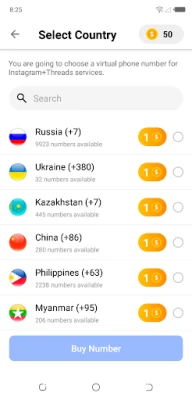
Global Coverage: Access a vast pool of temporary virtual numbers from multiple countries, ready for instant use.
Instant Verification: Receive your SMS verification codes quickly and reliably directly within the GetSMS app.
Multi-Platform Ready: Easily create new accounts or add a second verification layer for popular services.
🌐 Perfect For These Services
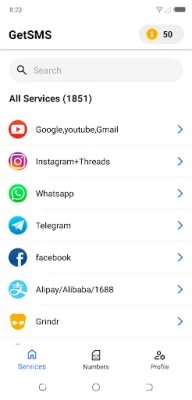
Create new accounts or verify existing ones on platforms like:
WhatsApp
Telegram
Instagram
TikTok
Google Gmail (and many more social, banking, and shopping sites!)
🚀 Usage Steps (Quick & Easy)
Using GetSMS is designed to be simple and fast. Get your code in seconds:
Select & Get: Open the GetSMS app and choose a virtual number from your desired country/region.
Input Number: Open your target platform (e.g., WhatsApp, Telegram) and enter your new virtual number.
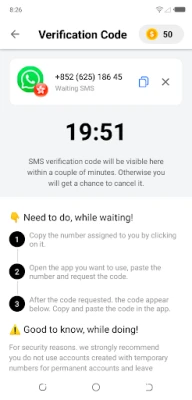
Receive Code: Get the SMS verification code instantly inside the GetSMS application.
Complete Verification: Paste the code into the relevant platform, and you're done!
You can now safely and privately use your new virtual number on the platform of your choice.
🚨 Trademark Notice
This application is an independent service and has no direct or official relationship with WhatsApp, Instagram, Telegram, Google Gmail, or any other services mentioned. The names of these services, associated trademarks, logos, and banners are the exclusive intellectual property of the relevant services' owners. All trademarks, product names, and company names or logos mentioned herein are the property of their respective owners.
Whether you need a number for personal privacy or professional business separation, GetSMS provides reliable solutions to perform SMS verification transactions instantly on popular global platforms.
✨ Why Choose GetSMS? Key Features
Ultimate Privacy: Never share your real phone number again. Use a virtual number to keep your identity private.
Global Coverage: Access a vast pool of temporary virtual numbers from multiple countries, ready for instant use.
Instant Verification: Receive your SMS verification codes quickly and reliably directly within the GetSMS app.
Multi-Platform Ready: Easily create new accounts or add a second verification layer for popular services.
🌐 Perfect For These Services
Create new accounts or verify existing ones on platforms like:
Telegram
TikTok
Google Gmail (and many more social, banking, and shopping sites!)
🚀 Usage Steps (Quick & Easy)
Using GetSMS is designed to be simple and fast. Get your code in seconds:
Select & Get: Open the GetSMS app and choose a virtual number from your desired country/region.
Input Number: Open your target platform (e.g., WhatsApp, Telegram) and enter your new virtual number.
Receive Code: Get the SMS verification code instantly inside the GetSMS application.
Complete Verification: Paste the code into the relevant platform, and you're done!
You can now safely and privately use your new virtual number on the platform of your choice.
🚨 Trademark Notice
This application is an independent service and has no direct or official relationship with WhatsApp, Instagram, Telegram, Google Gmail, or any other services mentioned. The names of these services, associated trademarks, logos, and banners are the exclusive intellectual property of the relevant services' owners. All trademarks, product names, and company names or logos mentioned herein are the property of their respective owners.
Rate the App
Add Comment & Review
User Reviews
Based on 0 reviews
No reviews added yet.
Comments will not be approved to be posted if they are SPAM, abusive, off-topic, use profanity, contain a personal attack, or promote hate of any kind.















More »

Popular Apps

Love Keyboard - Neon ThemesMetamorph AI Labs

LINE: Calls & MessagesLINE (LY Corporation)

Rakuten Viber MessengerViber Media

YouTubeGoogle LLC

InstagramInstagram
Gmail 5Google LLC
Hotspot Shield: Fast VPN ProxyAnchorfree LLC

FacebookMeta Platforms, Inc.

Google MeetGoogle LLC

Get aCC_e55Isometric cyberpunk adventure
More »
Editor's Choice
YouTubeGoogle LLC

ThreadsInstagram
Hotspot Shield: Fast VPN ProxyAnchorfree LLC
FacebookMeta Platforms, Inc.
Gmail 5Google LLC
LINE: Calls & MessagesLINE (LY Corporation)
InstagramInstagram
Rakuten Viber MessengerViber Media
Google MeetGoogle LLC
Norton360 Antivirus & SecurityNortonMobile